Floral Barrel Bouquet Black and White: A Guide to Using Vector Line Art Effectively
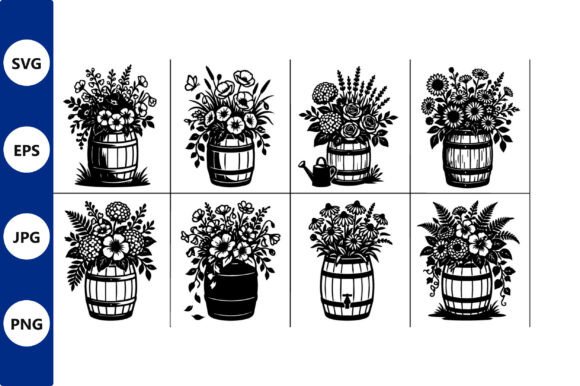
The appeal of Floral Barrel Bouquet Black and White lies in its timeless simplicity. This specific collection features a set of black and white floral bouquets arranged in wooden barrels, rendered as clean vector line art. Unlike full-color illustrations that dictate a specific mood through hue, these monochromatic designs offer flexibility. They show varied arrangements of leaves and stems, making them ideal for decorative projects or graphic design where color reuse is not desired. However, many creators rush into using these assets without understanding the technical nuances of vector files, leading to frustration during production.
Whether you are a small business owner creating custom decals, a hobbyist designing wall art, or a professional marketer looking for scalable graphics, understanding how to properly handle these digital downloads is crucial. The package typically includes high-quality SVG, EPS, PNG, and JPG formats, with each design individually cleaned up and optimized. Yet, having the right files is only half the battle; knowing how to use them correctly determines the quality of your final product.
Misunderstanding File Formats and Scalability
One of the most common mistakes beginners make is treating all file formats as equal. When you download this bundle, you receive SVG, EPS, PNG, and JPG files. Many users immediately grab the PNG or JPG because they are familiar with these image types from social media or web browsing. While these raster formats are useful for quick previews or web-only applications, they are not suitable for physical products that require resizing.
If you attempt to enlarge a PNG or JPG for a large wall decal or a banner, the image will pixelate. The edges become jagged, and the crisp lines of the floral arrangement turn into blurry blocks. This significantly lowers the perceived quality of your work. In contrast, the SVG and EPS files are vector-based. Vectors use mathematical equations to define lines and shapes, meaning they can be scaled to any size—from a tiny tattoo stencil to a massive storefront window display—without losing clarity.
Practical Advice: Always prioritize SVG or EPS files for any project involving cutting machines, large-format printing, or resizing. Reserve PNGs and JPGs for digital mockups or web content where the dimensions are fixed and small.
Overlooking Node Cleanup and Cutting Issues
Even though the description states that each design is "individually cleaned up," it is wise to inspect the nodes before sending files to a cutting machine like Cricut or Silhouette. Sometimes, complex line art can contain overlapping paths or unnecessary anchor points that confuse cutting software. If you ignore this step, your cutter may make erratic movements, tear the material, or fail to cut intricate parts of the leaves and stems.
This oversight affects efficiency and cost. Wasted vinyl, paper, or fabric adds up quickly, especially for entrepreneurs producing items in bulk. Furthermore, a poorly cut decal looks unprofessional and may not adhere properly to surfaces.
To avoid this, open the SVG file in your preferred vector editing software. Use the "weld" or "union" function to merge overlapping shapes if necessary. Check for stray points outside the main design area. Taking five minutes to verify the path integrity ensures smooth operation and reduces material waste.
Igno ring the Versatility of Monochrome Design
A frequent misconception is that black and white line art is limited in its application. Some creators believe these designs are only suitable for minimalist decor. This limits their potential. The Floral Barrel Bouquet Black and White collection is designed for versatility. Because the images lack color, they serve as perfect templates for various techniques.
For example, these vectors can be used for:
- Wood Burning: The clear lines transfer easily onto wood surfaces for rustic home decor.
- Embroidery: Simplify the lines further to create patterns for hand or machine embroidery.
- Tattoos: The organic flow of leaves and flowers makes them excellent references for flash sheets.
- Stencil Creation: Use the negative space to create reusable stencils for painting furniture or walls.
By recognizing that the absence of color is a feature, not a limitation, you unlock more creative avenues. You can add your own color palettes digitally or physically, adapting the bouquet to match seasonal trends or brand identities.
Neglecting License and Usage Rights
Before integrating these designs into commercial products, it is essential to review the license terms. Many digital downloads come with specific restrictions. While this bundle is marketed for creative projects, assuming you can resell the raw digital files is a critical error. Most licenses allow you to sell physical end products—such as printed t-shirts, mugs, or framed art—but prohibit the redistribution of the SVG or EPS files themselves.
Violating these terms can lead to account suspensions on marketplaces like Etsy or Amazon Handmade, damaging your business reputation. Always read the included documentation. If the terms are unclear, contact the creator for clarification. Protecting your business means respecting intellectual property rights.
Choosing the Right Software for Editing
Another overlooked detail is software compatibility. Not all design programs handle SVG and EPS files equally. Free online converters often strip away important layer information or convert vectors into low-resolution rasters inadvertently. For best results, use dedicated vector software such as Adobe Illustrator, Inkscape (free), or Affinity Designer.
If you are using cutting machine software like Cricut Design Space or Silhouette Studio, ensure you are using the version that supports SVG imports natively. Uploading a converted PDF or a poorly saved SVG can result in lost details, such as thin stems disappearing or leaves merging incorrectly.
Better Approach: Test one file from the bundle in your workflow before starting a large project. Import the SVG, resize it, and send a test cut. This small step confirms that your software settings are correct and that the file behaves as expected.
Final Considerations for Quality Output
When preparing these floral barrel designs for print, consider the line weight. Vector lines can be adjusted in thickness. For small items like jewelry tags or stickers, you might need to thicken the lines slightly to ensure they remain visible after printing. For large wall art, thinner lines may appear elegant and delicate. Adjusting stroke width is a simple yet powerful way to customize the look for different mediums.
Additionally, when using these designs for personalized decals, think about the background surface. Black line art stands out beautifully on light-colored walls or glass but may disappear on dark surfaces. In such cases, consider using the vector to create a white vinyl cutout instead of black, or add a contrasting border.
In summary, the Floral Barrel Bouquet Black and White collection offers high-quality, versatile assets for a wide range of creative projects. By avoiding common pitfalls related to file formats, node cleanup, licensing, and software compatibility, you can maximize the value of your purchase. Take the time to understand the tools and materials you are working with. This proactive approach ensures that your final products are professional, durable, and visually appealing, whether you are creating for personal enjoyment or commercial sale.